Skill delivery
Keep published skills available to agents, with verified snapshots and exact revision pins.
Overview#
Skill delivery makes one Learning container's published skills available to an agent without another CLI download or process restart. A framework adapter adds an alphabetical catalog and two tools.
The model decides when to load and follow a skill.
Developer instructions retain precedence. Skills cannot override the agent's role, safety rules, tool restrictions, or application policy.
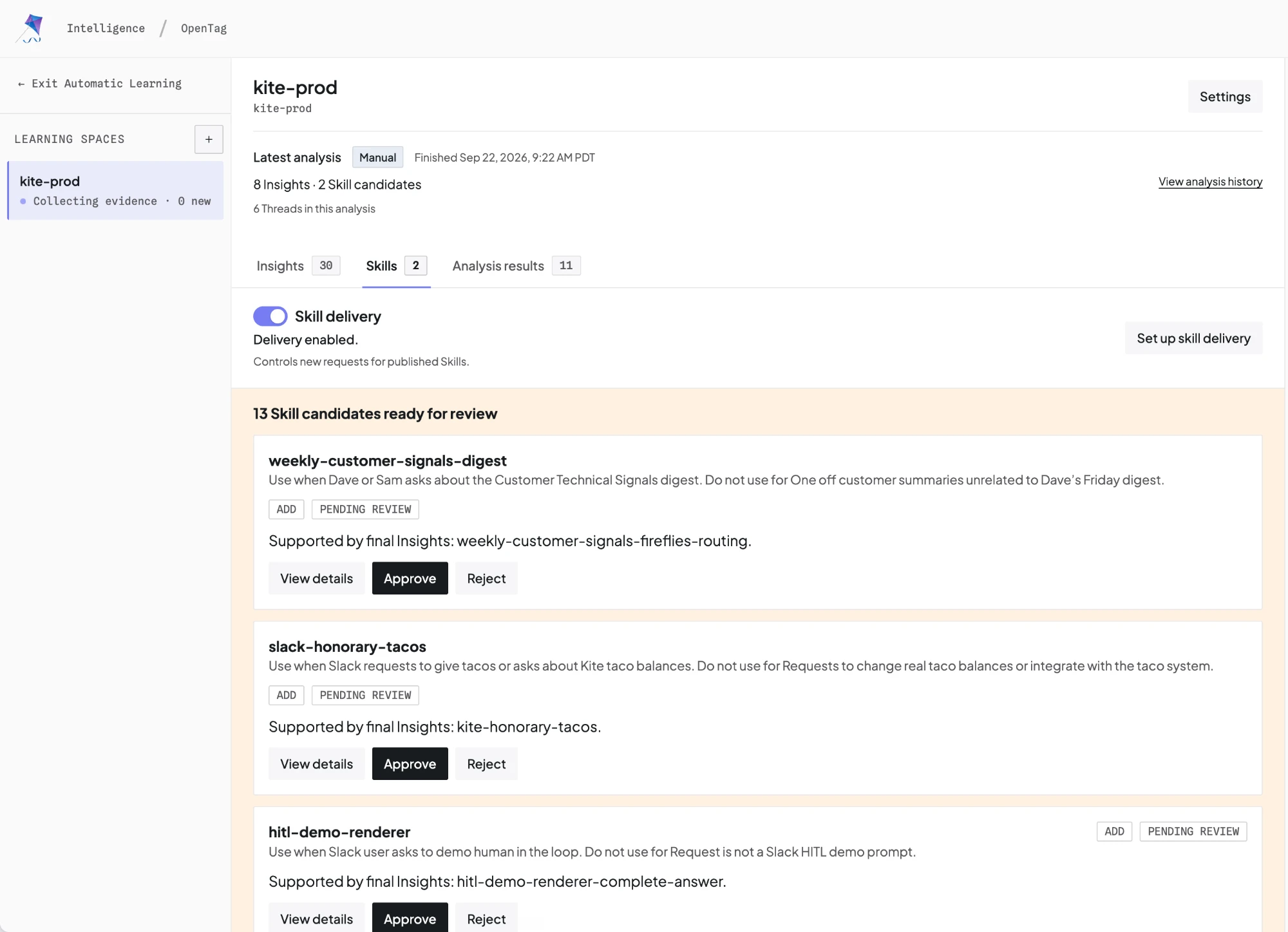
Start with Automatic Learning to collect threads, configure daily runs, and review skills. Before connecting an adapter, check that Skill delivery is enabled in the container's Skills tab. For guided setup, select Set up skill delivery there and copy the prompt into your coding agent.
Before you start#
The Intelligence SDK adapters load published Skills into your agent automatically. They add a catalog and tools that read skill instructions during a run.
Complete these steps before you run an example:
- Create a Learning container in your Intelligence project.
- Publish a Skill and enable Skill delivery in the container's Skills tab.
- Configure the agent with your project key and Learning container ID.
You can set the container and revision in code or with environment variables. The examples below show code parameters. To use environment variables instead, omit the corresponding parameters from the code. You can mix both approaches: an explicit code value overrides its environment variable.
For example, this environment configuration supplies the project key and container:
export CPK_INTELLIGENCE_API_KEY="your-project-key"
export CPK_INTELLIGENCE_LEARNING_CONTAINER_ID="support-learning"
# For self-hosted Intelligence, also set INTELLIGENCE_API_URL.
Set your model provider's credentials separately. Replace model placeholders with your configured model and install its provider package when required by your framework.
To follow the latest published Skills, omit the revision parameter in code and leave CPK_INTELLIGENCE_SKILLS_REVISION unset. See container configuration for exact revision pins.
Skill delivery does not send native agent runs to Automatic Learning. To collect new evidence, also assign your Runtime's Threads to a container.
Choose an adapter#
| Framework | Package | Native extension |
|---|---|---|
| BuiltInAgent | @copilotkit/runtime/v2 | learnedSkills configuration |
| LangGraph Python | copilotkit-intelligence-langgraph | create_skill_registry_middleware |
| LangGraph TypeScript | @copilotkit/intelligence-langgraph | createSkillRegistryMiddleware |
| Mastra | @copilotkit/intelligence-mastra | createSkillRegistryProcessor |
| Google ADK | copilotkit-intelligence-adk | SkillRegistry and SkillToolset |
| Microsoft Agent Framework | CopilotKit.Intelligence.AgentFramework | SkillRegistryContextProvider and AddCopilotKitIntelligenceSkills |
Attach an adapter to the agents that need skills. Adapters do not inspect or rebuild arbitrary graphs or agent hierarchies. Subagent behavior follows the selected framework.
TypeScript uses the canonical client from @copilotkit/runtime/v2. Python uses copilotkit-intelligence-runtime. These dependencies include Runtime features beyond skill delivery. The .NET adapter targets net9.0 and uses CopilotKit.Intelligence.
Native setup#
These adapters require the server and canonical client releases described below.
Each example shows an optional revision pin. Replace "exact-revision-id" with a published revision ID, or remove that parameter to use the environment fallback. If neither code nor environment specifies a revision, the adapter follows the latest published Skills. The SDK does not support "auto" as a special value.
BuiltInAgent#
Configure learnedSkills directly on BuiltInAgent. No wrapper or separate adapter package is required.
Set the container and revision in code below, or omit those parameters and use environment variables. Code values take precedence.
import { BuiltInAgent } from "@copilotkit/runtime/v2";

const agent = new BuiltInAgent({
  model: "openai/gpt-4o",
  prompt: "Follow the application's support policy.",
  learnedSkills: {
    // Set these here, or omit them to use environment variables (linked above).
    containerId: "support-learning",
    revision: "exact-revision-id", // Optional: pin a published revision.
  },
});
Set CPK_INTELLIGENCE_API_KEY for skill delivery and your model provider's key separately. The configuration also accepts an existing CopilotKitIntelligence instance as client, or explicit apiKey and apiUrl. These credentials apply to Intelligence, not the model provider. The environment fallbacks and refresh settings below apply.
Classic mode adds the catalog and both executable skill tools before the model call. When skills are available, the default step limit is 10 so the model can load and use guidance. An explicit maxSteps takes precedence. Without available skills, the existing default step limit remains unchanged.
Factory mode
BuiltInAgent fetches the snapshot before it calls your factory. Connect the catalog and tools to your model call:
Set the container and revision in code below, or omit those parameters and use environment variables. Code values take precedence.
import {
  BuiltInAgent,
  convertMessagesToVercelAISDKMessages,
} from "@copilotkit/runtime/v2";
import { openai } from "@ai-sdk/openai";
import { stepCountIs, streamText } from "ai";

const agent = new BuiltInAgent({
  type: "aisdk",
  learnedSkills: {
    // Set these here, or omit them to use environment variables (linked above).
    containerId: "support-learning",
    revision: "exact-revision-id", // Optional: pin a published revision.
  },
  factory: ({ input, abortSignal, learnedSkills }) =>
    streamText({
      model: openai("gpt-4o"),
      system: [
        "Follow the application's support policy.",
        learnedSkills.catalog,
      ].filter(Boolean).join("\n\n"),
      messages: convertMessagesToVercelAISDKMessages(input.messages),
      tools: { ...learnedSkills.tools },
      stopWhen: stepCountIs(10),
      abortSignal,
    }),
});
Import BuiltInAgentFactoryContext from @copilotkit/runtime/v2 to annotate a factory context. Every factory receives a learnedSkills object. Its catalog is "" and its tools is {} when delivery is unconfigured or the verified snapshot contains no skills. Omitting the configuration disables all skill requests, even when delivery environment variables exist. With configuration, later runs check for newly published skills according to the freshness window.
The tools use AI SDK schemas and executors. TanStack and custom factories receive the same object and must adapt the tools to their model library; they are not TanStack-native tool definitions. Factory code owns the model call and its step limit. Keep the supplied catalog and tools together within that invocation. The tool map is read-only; spread it into a new object to add application tools.
Each run, including a resume, acquires one snapshot before factory or model work. Agent clones share the refresh cache; each invocation retains its own snapshot. Cancellation stops that invocation's delivery wait without cancelling another clone's shared refresh. Snapshots stay out of application state. Existing cached skills can cover transient failures, but a confirmed delivery denial blocks new execution.
Reserve copilotkit_load_skill and copilotkit_read_skill_file for delivery. Classic mode rejects conflicting client, configuration, or MCP tool names. Factory code must avoid overwriting these names when it combines tool maps.
LangGraph Python#
Use Python 3.11 or later with native asynchronous agents from langchain.agents.create_agent.
Python adapter pending release
copilotkit-intelligence-langgraph is not yet published on PyPI. The code below previews its API; a public installation command will follow package publication.
Set the container and revision in code below, or omit those parameters and use environment variables. Code values take precedence.
import asyncio

from copilotkit_intelligence_langgraph import create_skill_registry_middleware
from langchain.agents import create_agent


async def main():
    skills = create_skill_registry_middleware(
        # Set these here, or omit them to use environment variables (linked above).
        container_id="support-learning",
        revision="exact-revision-id",  # Optional: pin a published revision.
    )  # Uses the environment above for the project key.
    try:
        await skills.initialize()
        agent = create_agent(
            "your-provider:your-model",
            system_prompt="Follow the application's support policy.",
            middleware=[skills],
        )
        result = await agent.ainvoke(
            {"messages": [{"role": "user", "content": "Help with a refund"}]}
        )
        print(result["messages"][-1].content)
    finally:
        await skills.aclose()


asyncio.run(main())
Use ainvoke or astream; synchronous execution is unsupported. The adapter supports LangChain >=1.2.16,<2 and LangGraph >=1.1.10,<2. Attach middleware explicitly to each agent that needs skills. Arbitrary compiled graphs are outside this integration.
LangGraph TypeScript#
Use Node.js 20.19 or later with native LangChain agents.
npm install @copilotkit/intelligence-langgraph langchain @langchain/core @langchain/langgraph zod
npm install --save-dev tsx
Save this example as agent.mts. Run it with npx tsx agent.mts:
Set the container and revision in code below, or omit those parameters and use environment variables. Code values take precedence.
import { createAgent } from "langchain";
import {
  SkillRegistry,
  createSkillRegistryMiddleware,
} from "@copilotkit/intelligence-langgraph";

const registry = new SkillRegistry({
  // Set these here, or omit them to use environment variables (linked above).
  containerId: "support-learning",
  revision: "exact-revision-id", // Optional: pin a published revision.
}); // Uses the environment above for the project key.
await registry.initialize(); // Catch this error in your application's startup code.
const skills = createSkillRegistryMiddleware({ registry });
const agent = skills.wrapAgent(
  createAgent({
    model: "your-provider:your-model",
    systemPrompt: "Follow the application's support policy.",
    middleware: [skills],
  }),
);
const result = await agent.invoke({
  messages: [{ role: "user", content: "Help with a refund" }],
});
console.log(result.messages.at(-1)?.content);
The wrapper is currently required because affected LangChain/LangGraph versions cannot keep private transient middleware state correctly. Use the wrapped agent for invoke, stream, and streamEvents, including native Command resumes. withConfig retains the wrapper. Apply default cancellation signals with agent.withConfig after wrapping, or pass the signal to each invocation. Stream objects, readers, and native cancellation remain available. Calling the middleware without its wrapper returns INVALID_CONFIG.
After the native framework fix passes the same lifecycle tests, middleware-only setup will become the default. The wrapper will be optional, and existing wrapped agents will continue to work.
Attach this middleware and its wrapper to each selected agent. Several agents can share one registry, but each wrapped invocation captures its own snapshot. Skills do not propagate automatically to arbitrary subagents. The wrapper supports the native agent's graph execution entry points for integrations that access .graph; graph batching and arbitrary compiled graph adaptation are outside this integration.
The supported dependency ranges are LangChain >=1.5.11,<2, LangGraph >=1.4.14,<2, and LangChain core >=1.2.10,<2. The registry owns in-memory snapshots and performs no filesystem writes. Your application retains ownership of an injected canonical client.
Mastra#
Use Node.js 22.13 or later with @mastra/core>=1.0.0,<2.
npm install @copilotkit/intelligence-mastra @mastra/core zod
npm install --save-dev tsx
Save this example as agent.mts. Run it with npx tsx agent.mts. Register the processor and its tools on the native Agent:
Set the container and revision in code below, or omit those parameters and use environment variables. Code values take precedence.
import { Agent } from "@mastra/core/agent";
import {
  SkillRegistry,
  createSkillRegistryProcessor,
} from "@copilotkit/intelligence-mastra";

const registry = new SkillRegistry({
  // Set these here, or omit them to use environment variables (linked above).
  containerId: "support-learning",
  revision: "exact-revision-id", // Optional: pin a published revision.
}); // Uses the environment above for the project key.
await registry.initialize(); // Catch this error in your application's startup code.
const skills = createSkillRegistryProcessor({ registry });
const agent = skills.wrapAgent(
  new Agent({
    id: "support",
    name: "Support",
    model: "openai/gpt-4.1",
    instructions: "Follow the application's support policy.",
    inputProcessors: [skills],
    tools: { ...skills.tools },
  }),
);
const result = await agent.generate("Help with a refund.");
Keep other processors and tools in the same arrays and maps. Reserve the names copilotkit_load_skill and copilotkit_read_skill_file for this adapter.
Call the wrapped agent for generate, stream, resumeGenerate, and resumeStream. The wrapper checks delivery before native execution and preserves Mastra's stream result. It also covers native tool approval and decline methods when your installed Mastra version provides them: approveToolCall, declineToolCall, approveToolCallGenerate, and declineToolCallGenerate. A resume starts a new invocation and captures the current verified snapshot, including when a tool runs before the next model call.
Register the processor and tools, and wrap each selected agent. Several agents can share a registry; each invocation keeps its own snapshot. Subagents follow Mastra's native propagation rules. Networks, legacy methods, background workers, and separate durable-worker dispatch are outside this integration.
Pass abortSignal in the invocation options to cancel both the delivery wait and native execution. A signal set only in the agent's defaultOptions applies to native execution, but cannot cancel the delivery wait that runs before it. Cancelling one invocation does not cancel a registry refresh shared with other callers.
Google ADK#
Use Python 3.11 or later and add SkillToolset to a standard ADK LlmAgent.
Python adapter pending release
copilotkit-intelligence-adk is not yet published on PyPI. The code below previews its API; a public installation command will follow package publication.
Set the container and revision in code below, or omit those parameters and use environment variables. Code values take precedence.
import asyncio

from copilotkit_intelligence_adk import SkillRegistry, SkillToolset
from google.adk.agents import LlmAgent
from google.adk.runners import Runner
from google.adk.sessions import InMemorySessionService
from google.genai import types


async def main():
    registry = SkillRegistry(
        # Set these here, or omit them to use environment variables (linked above).
        container_id="support-learning",
        revision="exact-revision-id",  # Optional: pin a published revision.
    )
    try:
        await registry.initialize()
        agent = LlmAgent(
            name="support",
            model="your-model",
            instruction="Follow the application's support policy.",
            tools=[SkillToolset(registry)],
        )
        sessions = InMemorySessionService()
        session = await sessions.create_session(app_name="support", user_id="demo")
        runner = Runner(agent=agent, app_name="support", session_service=sessions)
        message = types.Content(
            role="user", parts=[types.Part(text="Help with a refund.")]
        )
        async for event in runner.run_async(
            user_id="demo", session_id=session.id, new_message=message
        ):
            if event.is_final_response() and event.content:
                for part in event.content.parts or []:
                    if part.text:
                        print(part.text)
    finally:
        await registry.aclose()


asyncio.run(main())
The adapter supports google-adk>=1.17,<2. Several selected agents can share one registry. Closing a toolset does not close that shared registry. Native resumed runs receive a fresh invocation pin; session state contains no snapshot or lock.
Microsoft Agent Framework#
Use the provider's native agent factory with your application's IChatClient:
Set the container and revision in code below, or omit those parameters and use environment variables. Code values take precedence.
using CopilotKit.Intelligence.AgentFramework;
using Microsoft.Agents.AI;

using var skills = new SkillRegistryContextProvider(new SkillRegistryOptions
{
    // Set these here, or omit them to use environment variables (linked above).
    ContainerId = "support-learning",
    Revision = "exact-revision-id", // Optional: pin a published revision.
});
await skills.InitializeAsync();
var agent = skills.CreateAgent(chatClient, new ChatClientAgentOptions
{
    Name = "support",
    ChatOptions = new() { Instructions = "Follow the application's support policy." }
});
var response = await agent.RunAsync("Help with a refund.");
The adapter targets .NET 9 and Agent Framework >=1.0.0,<2.0.0. AddCopilotKitIntelligenceSkills also registers a keyed provider and native agent through dependency injection. Use this extension or CreateAgent for complete invocation checks. Background responses and continuation tokens are unsupported because the framework bypasses context providers for those calls.
Configure one container#
Each registry or middleware instance reads one Learning container. Set containerId in TypeScript, container_id in Python, or ContainerId in .NET, as shown above. BuiltInAgent uses learnedSkills.containerId.
These fields accept one stable container ID, not a list. Use separate registries for agents that read different containers. Several agents can share one registry when they use the same container.
An injected canonical Intelligence client supplies its existing project key, endpoint, and HTTP lifecycle. Your application retains ownership of that client. The adapter does not construct a second authenticated transport.
Environment-based setup uses these variables. npx copilotkit@latest project select writes the project key. If the CLI has no session, run npx copilotkit@latest login first. If the agent server is a different directory, copy the key into this environment.
CPK_INTELLIGENCE_API_KEY=cpk-...
CPK_INTELLIGENCE_LEARNING_CONTAINER_ID=expense-review
# Self-hosted deployments only:
INTELLIGENCE_API_URL=https://intelligence.example.com
# Optional exact revision; omit to follow latest:
CPK_INTELLIGENCE_SKILLS_REVISION=42
Explicit configuration overrides environment values. An injected client overrides connection environment values. Freshness and request timeout each default to five seconds; debug logging defaults to false. Configure these behavior options in code.
Initialization can run during application startup. A valid empty container initializes successfully. Initialization failures are catchable and retryable; the adapter never terminates the process. Model work cannot start until a verified snapshot exists.
Reuse an Intelligence SDK client#
If your server already creates an Intelligence client, pass that client to the registry. This reuses its project key and endpoint.
Set the container and revision in code below, or omit those parameters and use environment variables. Code values take precedence.
import { CopilotKitIntelligence } from "@copilotkit/runtime/v2";
import { SkillRegistry } from "@copilotkit/intelligence-mastra";

const intelligence = new CopilotKitIntelligence({
  apiKey: process.env.CPK_INTELLIGENCE_API_KEY!,
  apiUrl: process.env.INTELLIGENCE_API_URL,
});
const registry = new SkillRegistry({
  client: intelligence,
  // Set these here, or omit them to use environment variables (linked above).
  containerId: "support-learning",
  revision: "exact-revision-id", // Optional: pin a published revision.
});
await registry.initialize();
For LangGraph TypeScript, import SkillRegistry from @copilotkit/intelligence-langgraph and use the same configuration. Then pass the registry to the framework adapter shown above.
Make sure delivery works#
For framework adapters, this check requires automatic updates. Remove revision (or Revision in .NET) from the example and unset CPK_INTELLIGENCE_SKILLS_REVISION. A pinned adapter continues to use its selected revision after you publish a newer one.
- Initialize the adapter with a published Skill in its container. Record the loaded revision from the adapter's status.
- Start a new invocation with a request that relates to that Skill.
- Inspect the model's tool calls for
copilotkit_load_skilland, when needed,copilotkit_read_skill_file. - Publish a new revision, wait past the freshness window, and start another invocation.
- Make sure that the loaded revision in the adapter's status changed to the newly published revision.
Read registry.status.revision in TypeScript, skills.status.revision for LangGraph Python, registry.status.revision for ADK, or skills.Status.Revision in .NET. BuiltInAgent does not expose a public registry status; inspect the loaded Skill's content in the tool result for your published change. A valid empty container can initialize successfully, so initialization alone does not prove that a Skill exists.
The model chooses whether to call the skill tools. A run without a skill tool call does not prove that delivery failed. Inspect the catalog and registry status too.
Refresh and invocation behavior#
Before an invocation, the registry checks whether its last successful check falls within the freshness window. When a check is due, that invocation waits for it. Concurrent invocations share one request, with no internal retry. An unchanged response resets the freshness window without transferring the ZIP again.
Each invocation keeps one complete snapshot for its model and tool calls. A later refresh affects later invocations. Revision identifiers are opaque: pass the exact string without parsing, incrementing, or comparing it numerically.
| Mode | Behavior |
|---|---|
latest | Adopt the complete newest published snapshot after a successful check. |
| Exact revision | Keep the selected complete skill set while continuing authorization and revocation checks. |
Published revisions have no automatic expiry. A revoked revision cannot be used by new invocations once the adapter receives that denial. An invocation already in progress finishes with its captured snapshot.
Read tools#
The framework adapters keep both tools registered even when the snapshot is empty. BuiltInAgent omits both tools for an empty snapshot; its factory receives tools: {}. With available skills, the tools are:
copilotkit_load_skill(skill_name)returnsSKILL.mdand the supporting file list.copilotkit_read_skill_file(skill_name, path)returns one supporting UTF-8 text file.
Lookups match the invocation's manifest. Unknown names, unknown paths, and unsupported content use the framework's tool-error behavior. The adapter never executes scripts or writes skill files to disk.
Failures and status#
A cold registry returns a typed error when it cannot load a valid snapshot. After a successful load, a network failure, timeout, unavailable server, or unreadable replacement keeps the previous snapshot and marks it stale.
There is no maximum stale age. A network-isolated process can retain its last verified snapshot until connectivity returns. Restarting clears that in-memory snapshot. Confirmed authentication, authorization, entitlement, delivery disablement, or revocation blocks new invocations instead of falling back to stale content.
The read-only status contains initialized, revision, mode, lastCheckedAt, stale, and lastError. Errors expose a stable code, safe message, retryable, and cause. Debug mode uses the normal language logger and excludes credentials, prompts, skill bodies, and file contents.
Migrate from downloaded skills#
Remove the old manual Learning-directory wiring when you enable an adapter for the same container. Keep unrelated static or hand-authored skills as needed. The adapter does not scan, change, or delete downloaded files.
copilotkit skills download remains supported for inspection, offline use, and unsupported frameworks. See the Automatic Learning guide for the manual workflow.
Deployment requirements#
Cloud-hosted and self-hosted Intelligence use the same delivery contract. The server migration and v1 delivery endpoint must deploy before adapters rely on them. Each adapter also requires a published canonical client version with the learned-snapshot operation.
Pausing new Learning runs does not stop delivery. Entitlement, explicit delivery disablement, and revision revocation control access to published snapshots separately.