Channels
Run one AG-UI agent in Slack, Microsoft Teams, and more through cloud-hosted Intelligence connections.
Start with your coding agent#
Copy this prompt into your coding agent to choose a framework, set up your agent, and connect it to Slack or Microsoft Teams with CopilotKit Intelligence. Prefer to work through the setup yourself? Follow the guides below.
Channels brings your agent into the conversations where work already happens. Your agent still runs in your infrastructure. CopilotKit Intelligence owns the channel connection (Slack, Teams, Discord, etc.), delivers each turn to your Channels SDK listener, and sends the response back as native channel UI.
How Channels connects your agent#
Channels connects the agent and application logic you run to the provider connection managed by CopilotKit Intelligence. The diagram shows the boundaries between those systems and the path each message takes.
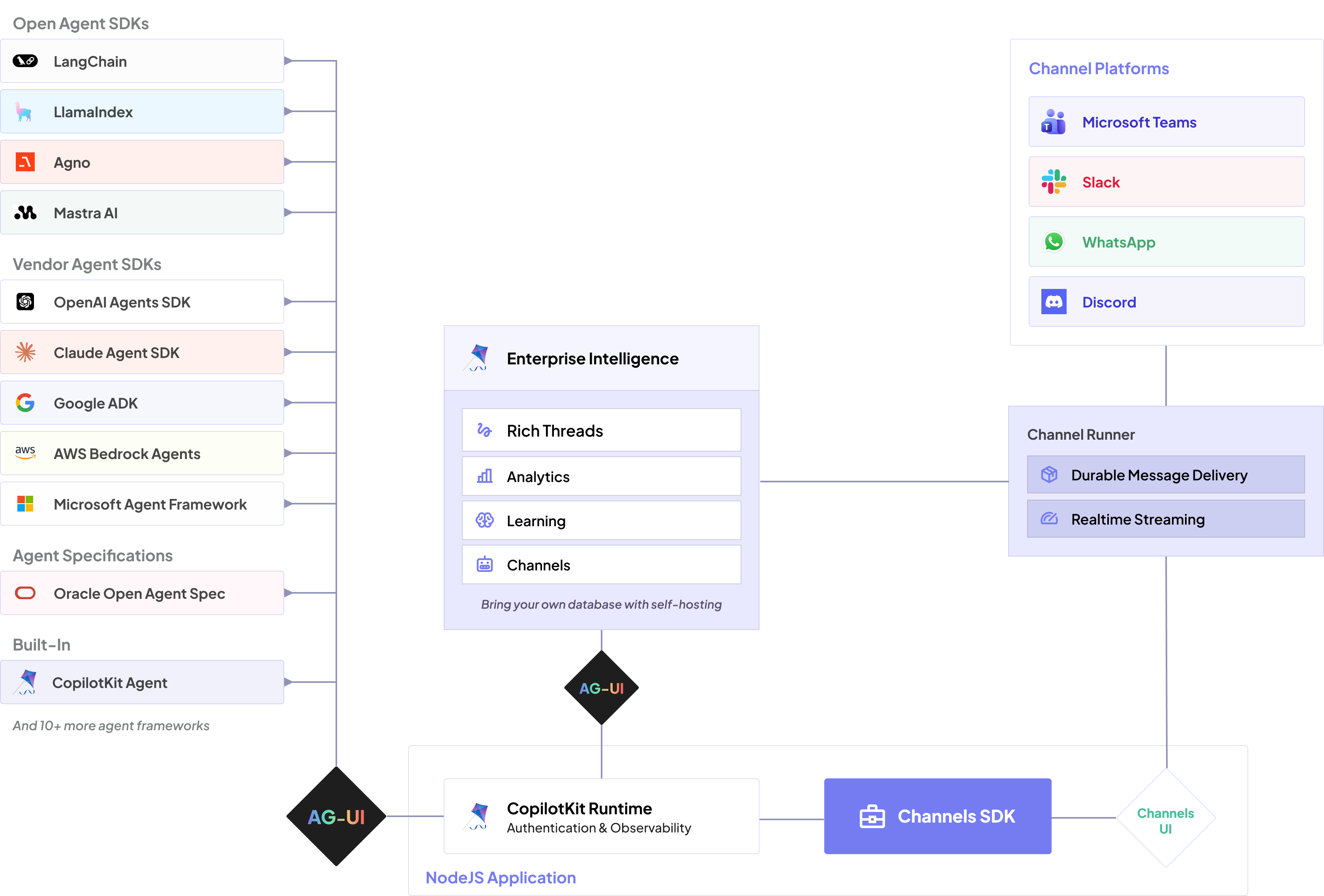
As explained in the CopilotKit Intelligence overview, the dividing line between CopilotKit open source and CopilotKit Intelligence is durable data: functionality that runs without it is open source, while functionality built on connections to durable data — databases and the state kept in them — is part of CopilotKit Intelligence. A channel runner needs durable data to run correctly in production: simultaneous participants, race conditions, retries, and delivery guarantees all depend on it. CopilotKit Intelligence provides the managed channel runner, and channels running on it also get the rest of CopilotKit Intelligence, including Product Analytics, Automatic Learning, and governance. You can absolutely build and operate your own channel runner on the open-source Channels SDK — you implement the durable-data layer yourself.
Each message moves through the same five stages:
- A person messages your app in Slack or Teams.
- CopilotKit Intelligence receives the platform event using the credentials configured for that Channel.
- A persistent Intelligence gateway connection delivers the turn to your long-running Channels SDK process.
- The SDK runs your agent over AG-UI, executes channel tools, and renders the response.
- Intelligence sends the result back as native Slack Block Kit or Teams Adaptive Card content.
This split keeps platform credentials out of your agent process without moving your agent, tools, or business logic into CopilotKit.
| You run | CopilotKit Intelligence manages |
|---|---|
| The agent and its model credentials | Slack and Teams platform credentials |
| A long-running Channels SDK listener | Platform ingress and credentialed delivery |
| Tools and approval business logic | Runtime registration, health, and reconnects |
| Deployment, logs, and application auth | Conversation-history delivery to the listener |
Production self-hosting: Run CopilotKit Intelligence in your own infrastructure#
Production self-hosting keeps your Channels configuration, provider credentials, delivery state, and platform operations inside your network, giving your organization control over data residency, security, and infrastructure. You can fully self-host the Channels SDK. Onboarding guides are coming soon; in the meantime, if you're comfortable with Docker and Kubernetes, go right ahead — and we're happy to help. Book time with a CopilotKit engineer.
Next step#
Continue to Configure the Channel in Intelligence to create the managed Slack connection.