Microsoft Teams
Build a Microsoft Teams bot with CopilotKit and Copilot Runtime from an empty Node project.
What you will build#
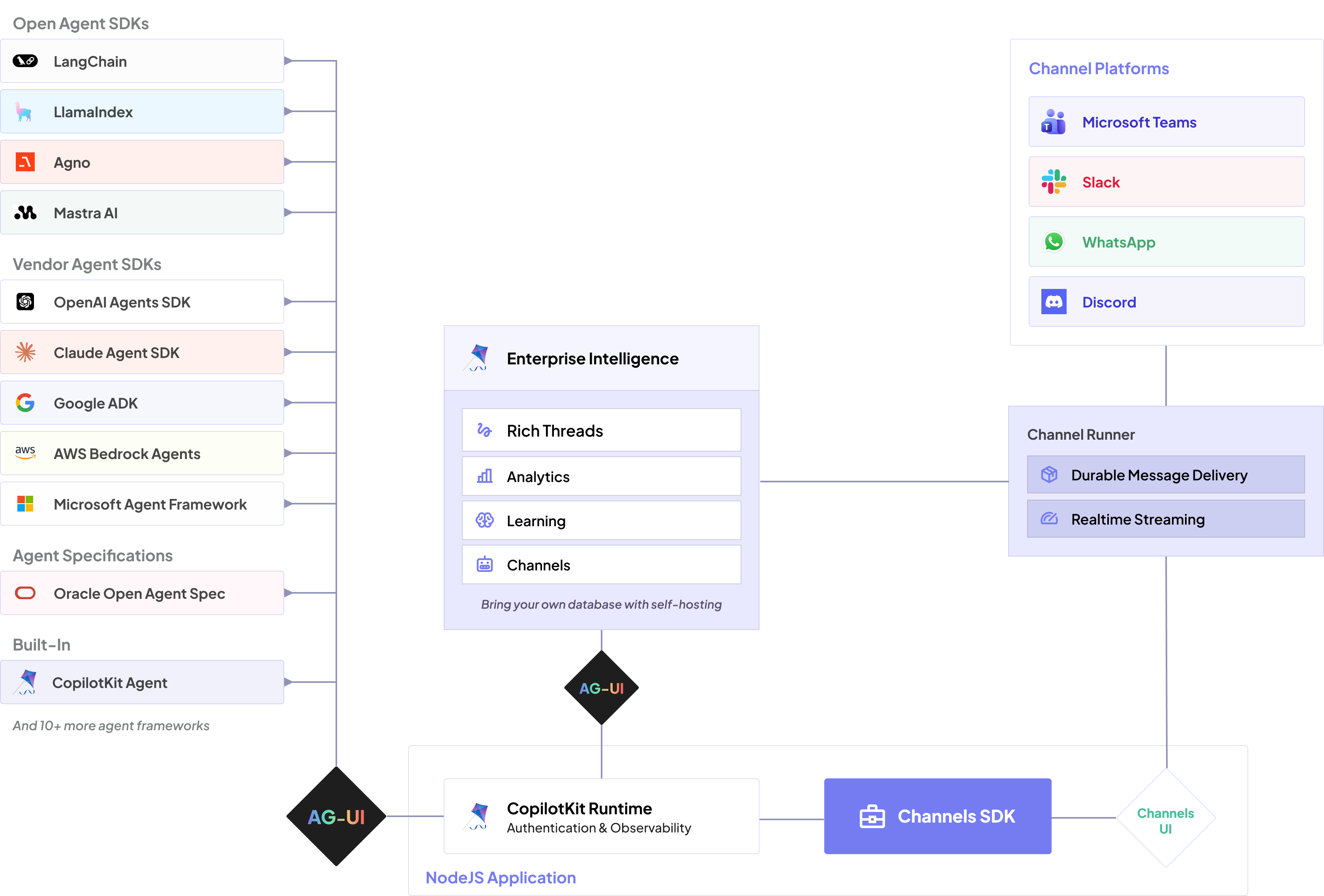
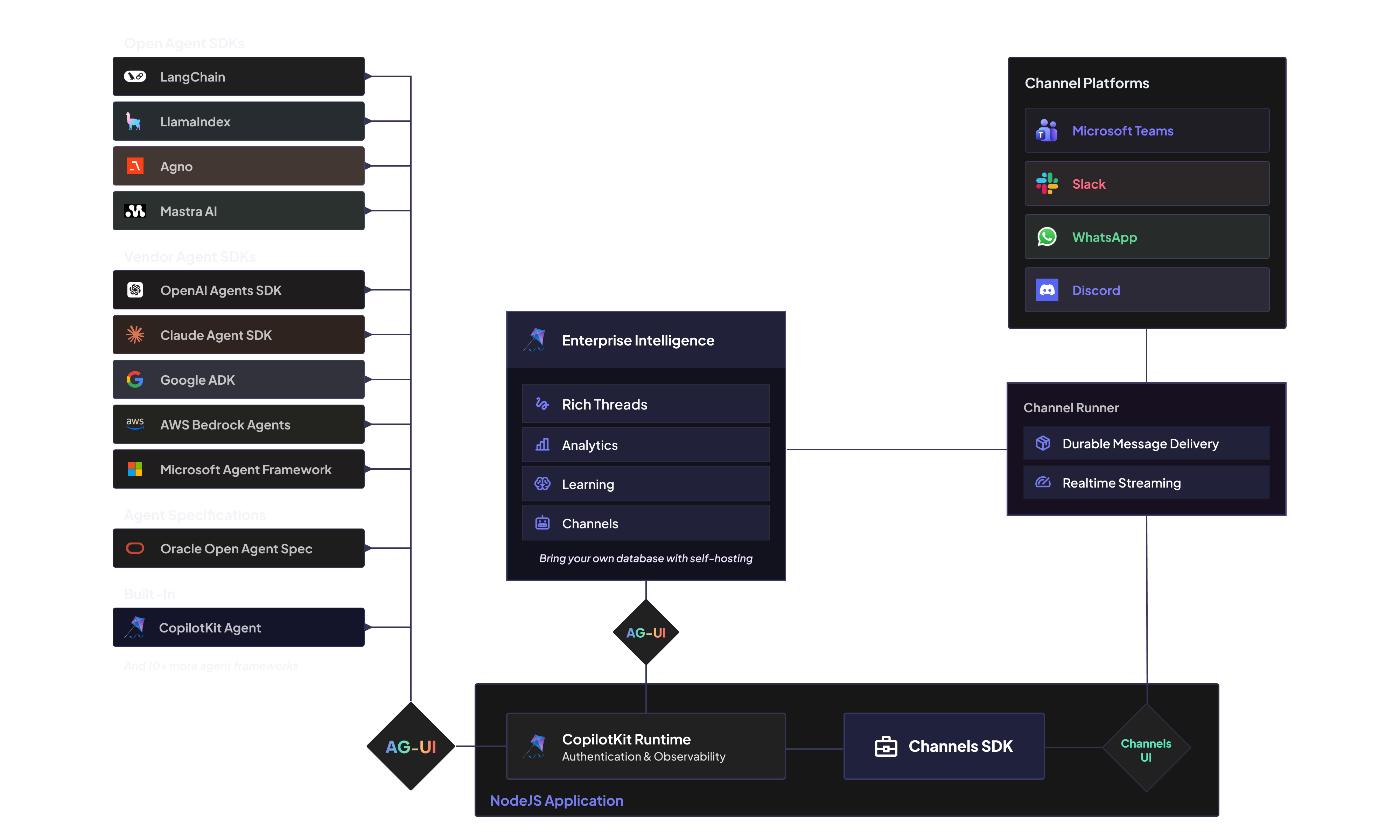
By the end of this guide, you will have a small Node app that can answer Microsoft Teams messages through Copilot Runtime. You will test it locally first with Teams DevTools, then optionally expose the same bot through Azure Bot Service and sideload it into Microsoft Teams.
@copilotkit/bot-teams handles the Teams-specific work: receiving Teams activities, rendering
Adaptive Cards, streaming updates, and running the local DevTools bridge. Your app provides the
Copilot Runtime, agent configuration, Microsoft credentials, tunnel, and Teams manifest.
| Process | Port | Purpose |
|---|---|---|
| Copilot Runtime | 8200 | Runs a BuiltInAgent and exposes /api/copilotkit |
| Teams bot | 3978 | Receives Teams activities at POST /api/messages |
| Teams DevTools | 3979 | Local browser UI for testing Teams messages without a Teams account |
Prerequisites#
For local development:
- Node.js 22 or newer
- npm 10 or newer
- an OpenAI API key
For sideloading into Microsoft Teams:
- the
devtunnelCLI - a Microsoft 365 tenant that allows uploading custom apps
- access to create a Microsoft Entra app registration
- access to create an Azure Bot resource
Build and verify locally#
Create the Node project#
Start with a new Node project and install Copilot Runtime, the core package, and the Teams bridge:
mkdir copilotkit-teams-bot
cd copilotkit-teams-bot
npm init -y
npm install @copilotkit/bot-teams@0.0.1 @copilotkit/core@1.59.1 @copilotkit/runtime
npm install -D tsx typescript @types/nodemkdir copilotkit-teams-bot
cd copilotkit-teams-bot
pnpm init
pnpm add @copilotkit/bot-teams@0.0.1 @copilotkit/core@1.59.1 @copilotkit/runtime
pnpm add -D tsx typescript @types/nodemkdir copilotkit-teams-bot
cd copilotkit-teams-bot
yarn init -y
yarn config set nodeLinker node-modules
yarn add @copilotkit/bot-teams@0.0.1 @copilotkit/core@1.59.1 @copilotkit/runtime
yarn add -D tsx typescript @types/nodeWhy these versions are pinned
The Teams bridge is early access. @copilotkit/bot-teams@0.0.1 expects
@copilotkit/core@1.59.1, so the quickstart pins that pair to keep
CopilotKitCore types aligned.
Add TypeScript#
Create tsconfig.json:
{
"compilerOptions": {
"target": "ES2022",
"module": "NodeNext",
"moduleResolution": "NodeNext",
"strict": true,
"esModuleInterop": true,
"skipLibCheck": true
}
}Add Copilot Runtime and the Teams bot#
Create bot.cts. This single file starts both Copilot Runtime and the Teams-facing bot:
import { createServer } from "node:http";
import { CopilotKitCore } from "@copilotkit/core";
import { createTeamsAgentBot } from "@copilotkit/bot-teams/bot";
import { BuiltInAgent, CopilotRuntime } from "@copilotkit/runtime/v2";
import { createCopilotNodeListener } from "@copilotkit/runtime/v2/node";
const agentId = "assistant";
const runtimePort = Number(process.env.RUNTIME_PORT ?? 8200);
const botPort = Number(process.env.PORT ?? 3978);
const runtimeUrl = `http://localhost:${runtimePort}/api/copilotkit`;
const runtime = new CopilotRuntime({
agents: {
[agentId]: new BuiltInAgent({
model: process.env.OPENAI_MODEL ?? "openai:gpt-5-mini",
prompt:
"You are a helpful Microsoft Teams assistant. Keep replies concise and useful.",
}),
},
});
createServer(
createCopilotNodeListener({
runtime,
basePath: "/api/copilotkit",
cors: true,
}),
).listen(runtimePort, () => {
console.log(`Copilot Runtime listening at ${runtimeUrl}`);
});
const core = new CopilotKitCore({ runtimeUrl });
core.setDefaultThrottleMs(1000);
core.registerProxiedAgent({
agentId,
runtimeAgentId: agentId,
});
async function main() {
const bot = createTeamsAgentBot({
core,
agentId,
approvalTimeoutMs: 5 * 60 * 1000,
reviewerName: "Reviewer",
});
await bot.start(botPort);
console.log(`Teams bot listening at http://localhost:${botPort}/api/messages`);
console.log(`Teams DevTools available at http://localhost:${botPort + 1}/devtools`);
}
main().catch((error) => {
console.error(error);
process.exit(1);
});Your project should now look like this:
copilotkit-teams-bot/
package.json
tsconfig.json
bot.ctsRun the bot#
Set your OpenAI key and start the bot:
export OPENAI_API_KEY=sk-...
npx tsx bot.cts$env:OPENAI_API_KEY="sk-..."
npx tsx bot.ctsOpen http://localhost:3979/devtools and send:
Hello from TeamsLocal verification
If you receive a response card in DevTools, Copilot Runtime and the Teams bot are working locally.
Sideload into Microsoft Teams#
The local DevTools path does not require Microsoft credentials. The real Teams client does. Keep the
same bot.cts; add a tunnel, a Microsoft app registration, an Azure Bot resource, and a Teams app
manifest.
Create a public tunnel#
In a separate terminal, expose the bot port:
devtunnel create copilotkit-teams-local -a
devtunnel port create copilotkit-teams-local -p 3978
devtunnel host copilotkit-teams-localCopy the HTTPS tunnel URL. Your bot messaging endpoint will be:
https://<your-tunnel-host>/api/messagesCreate Microsoft credentials#
In Microsoft Entra ID:
- Create an app registration.
- Copy the Application (client) ID. This is your Teams bot ID.
- Copy the Directory (tenant) ID.
- Create a client secret and copy its value.
In Azure Bot Service:
- Create a bot resource that uses the app registration from Entra ID.
- Set the messaging endpoint to
https://<your-tunnel-host>/api/messages. - Enable the Microsoft Teams channel.
Run the bot with those credentials:
export OPENAI_API_KEY=sk-...
export CLIENT_ID=<application-client-id>
export CLIENT_SECRET=<client-secret-value>
export TENANT_ID=<directory-tenant-id>
npx tsx bot.cts$env:OPENAI_API_KEY="sk-..."
$env:CLIENT_ID="<application-client-id>"
$env:CLIENT_SECRET="<client-secret-value>"
$env:TENANT_ID="<directory-tenant-id>"
npx tsx bot.ctsCreate the Teams app package#
Create appPackage/manifest.json:
{
"$schema": "https://developer.microsoft.com/en-us/json-schemas/teams/v1.19/MicrosoftTeams.schema.json",
"manifestVersion": "1.19",
"version": "1.0.0",
"id": "<new-teams-app-uuid>",
"developer": {
"name": "Your company",
"websiteUrl": "https://example.com",
"privacyUrl": "https://example.com/privacy",
"termsOfUseUrl": "https://example.com/terms"
},
"name": {
"short": "CopilotKit Bot",
"full": "CopilotKit Teams Bot"
},
"description": {
"short": "A CopilotKit assistant for Microsoft Teams.",
"full": "A Microsoft Teams bot powered by CopilotKit."
},
"icons": {
"outline": "outline.png",
"color": "color.png"
},
"accentColor": "#5B5FC7",
"bots": [
{
"botId": "<application-client-id>",
"scopes": ["personal"],
"supportsFiles": false,
"isNotificationOnly": false
}
],
"validDomains": ["<your-tunnel-host>"]
}Replace:
<new-teams-app-uuid>with a new UUID for this Teams app package<application-client-id>with the Entra application client ID<your-tunnel-host>with the tunnel host only, withouthttps://
Add the required Teams icons:
appPackage/color.png: 192 x 192appPackage/outline.png: 32 x 32, transparent background
appPackage/
manifest.json
color.png
outline.pngPackage the manifest:
cd appPackage
zip -r appPackage.local.zip manifest.json color.png outline.pngUpload and test in Teams#
In Microsoft Teams:
- Go to Apps.
- Select Manage your apps.
- Select Upload a custom app.
- Choose
appPackage/appPackage.local.zip. - Open a personal chat with the bot and send
Hello.
You should receive the same response you saw in DevTools.
Troubleshooting#
DevTools opens but messages do not answer
Confirm OPENAI_API_KEY is set in the terminal running npx tsx bot.cts, and check that
http://localhost:8200/api/copilotkit/info returns the assistant agent.
Teams says the bot cannot be reached
Confirm the Azure Bot messaging endpoint is exactly https://<your-tunnel-host>/api/messages,
and that devtunnel host copilotkit-teams-local is still running.
Teams returns auth errors
Confirm CLIENT_ID, CLIENT_SECRET, and TENANT_ID match the Entra app registration used by
the Azure Bot resource.
Upload a custom app is missing
Your Microsoft 365 tenant does not allow sideloading for your account. Ask a tenant admin to enable custom app upload for Teams.
Port 3978 or 8200 is already in use
Stop the process using that port, or set PORT and RUNTIME_PORT before running
npx tsx bot.cts.