Common LangGraph issues
Common issues you may encounter when using LangGraph.
Welcome to the CoAgents Troubleshooting Guide! If you're having trouble getting tool calls to work, you've come to the right place.
Have an issue not listed here? Open a ticket on GitHub or reach out on Discord and we'll be happy to help.
We also highly encourage any open-source contributors that want to add their own troubleshooting issues to GitHub as a pull request.
My tool calls are not being streamed#
This could be due to a few different reasons.
First, we strongly recommend checking out our Human In the Loop guide to follow a more in depth example of how to stream tool calls in your LangGraph agents. You can also check out our travel tutorial which talks about how to stream tool calls in a more complex example.
If you have already done that, you can check the following:
You're using llm.invoke() instead of llm.ainvoke()
When you invoke your LangGraph agent, you can invoke it synchronously or asynchronously. If you invoke it synchronously, the tool calls will not be streamed progressively, only the final result will be streamed. If you invoke it asynchronously, the tool calls will be streamed progressively.
config = copilotkit_customize_config(config, emit_tool_calls=["say_hello_to"])
response = await llm_with_tools.ainvoke(
    [ SystemMessage(content=system_message), *state["messages"] ],
    config=config
)
Error: 'AzureOpenAI' object has no attribute 'bind_tools'#
This error is typically due to the use of an incorrect import from LangGraph. Instead of importing AzureOpenAI import AzureChatOpenAI and your
issue will be resolved.
from langchain_openai import AzureOpenAI
from langchain_openai import AzureChatOpenAI
I am getting "agent not found" error#
If you're seeing this error, it means CopilotKit couldn't find the LangGraph agent you're trying to use. Here's how to fix it:
Verify your agent lock mode configuration
If you're using agent lock mode,
check that the agent defined in langgraph.json matches what's defined in the CopilotKit provider:
{
    "python_version": "3.12",
    "dockerfile_lines": [],
    "dependencies": ["."],
    "graphs": {
        "my_agent": "./src/agent.py:graph"// In this case, "my_agent" is the agent you're using
    },
    "env": ".env"
}<CopilotKit agent="my_agent">
{/* Your application components */}
</CopilotKit>Common issues:
- Typos in agent names
- Case sensitivity mismatches
- Missing entries in
langgraph.json
Check your agent registration on a LangGraph Platform endpoint
When using LangGraph Platform endpoint, make sure your agents are properly specified and are following the definition in your langgraph.json:
{
    "python_version": "3.12",
    "dockerfile_lines": [],
    "dependencies": ["."],
    "graphs": {
        "my_agent": "./src/agent.py:graph"// In this case, "my_agent" is the agent you're using
    },
    "env": ".env"
}const runtime = new CopilotRuntime({
// ... The rest of your CopilotRuntime definition
agents: {
'my_agent': new LangGraphAgent({
deploymentUrl: '<your-api-url>',
graphId: 'my_agent',
langsmithApiKey: '<your-langsmith-api-key>' // Optional
}),
},
});Check your agent name in useAgent
Make sure that the agent defined in langgraph.json matches the agentId you pass to the useAgent hook:
{
    "python_version": "3.12",
    "dockerfile_lines": [],
    "dependencies": ["."],
    "graphs": {
        "my_agent": "./src/agent.py:graph"// In this case, "my_agent" is the agent you're using
    },
    "env": ".env"
}// Your React component
useAgent({
agentId: "my_agent",
});Check your agent name in useCoAgentStateRender
Make sure that the agent defined in langgraph.json matches the name you pass to the useCoAgentStateRender hook:
{
    "python_version": "3.12",
    "dockerfile_lines": [],
    "dependencies": ["."],
    "graphs": {
        "my_agent": "./src/agent.py:graph"// In this case, "my_agent" is the agent you're using
    },
    "env": ".env"
}// Your React component
useCoAgentStateRender({
name: "my_agent", // This must match exactly
});Connection issues with tunnel creation#
If you notice the tunnel creation process spinning indefinitely, your router or ISP might be blocking the connection to CopilotKit's tunnel service.
Router or ISP blocking tunnel connections
To verify connectivity to the tunnel service, try these commands:
ping tunnels.devcopilotkit.com
curl -I https://tunnels.devcopilotkit.com
telnet tunnels.devcopilotkit.com 443
If these fail, your router's security features or ISP might be blocking the connection. Common solutions:
- Check router security settings
- Consider checking with your ISP about any connection restrictions
- Try using a mobile hotspot
I am getting "Failed to find or contact remote endpoint at url, Make sure the API is running and that it's indeed a LangGraph platform url" error#
If you're seeing this error, it means the LangGraph platform client cannot connect to your endpoint.
Verify the endpoint is reachable
Check the logs for the backend API running on the remote endpoint url. Make sure it is up and ready to receive requests
Verify running a LangGraph platform endpoint using LangGraph deployment tools
Verify that the backend API is running using langgraph dev, langgraph up, on a LangGraph cloud url or equivalent methods supplied by LangGraph
Verify the remote endpoint matches the endpoint definition type
If you are running your remote endpoint using FastAPI, even if it uses LangGraph for the agent, it is not considered a LangGraph platform endpoint.
You may need to change your remoteEndpoints definition for this endpoint to match the expected format.
Change the endpoint definition, from:
new CopilotRuntime({
  remoteEndpoints: [
    langGraphPlatformEndpoint({
    deploymentUrl: "https://your-fastapi-endpoint:port",
    langsmithApiKey: '<langsmith API key>' // optional
    agents: [], // Your previous agents definition
  ],
});

// or

new CopilotRuntime({
  agents: {
    'agent-name': new LangGraphAgent({
      deploymentUrl: "https://your-fastapi-endpoint:port",
      langsmithApiKey: '<langsmith API key>', // optional
      graphId: 'langgraph.json graph id', // Your previous graphId definition
    }),
  }
});
To:
import { HttpAgent } from "@ag-ui/client";

new CopilotRuntime({
    agents: {
        'agent-name': new HttpAgent({
            url: 'https://your-fastapi-endpoint:port/your-agent-uri'
        }),
    }
});
I am getting a "No checkpointer set" error when using LangGraph with FastAPI#
If you're encountering this error, it means you are missing a checkpointer in your compiled graph. You can visit the LangGraph Persistence guide to understand what a checkpointer is and how to add it.
I see messages being streamed and disappear#
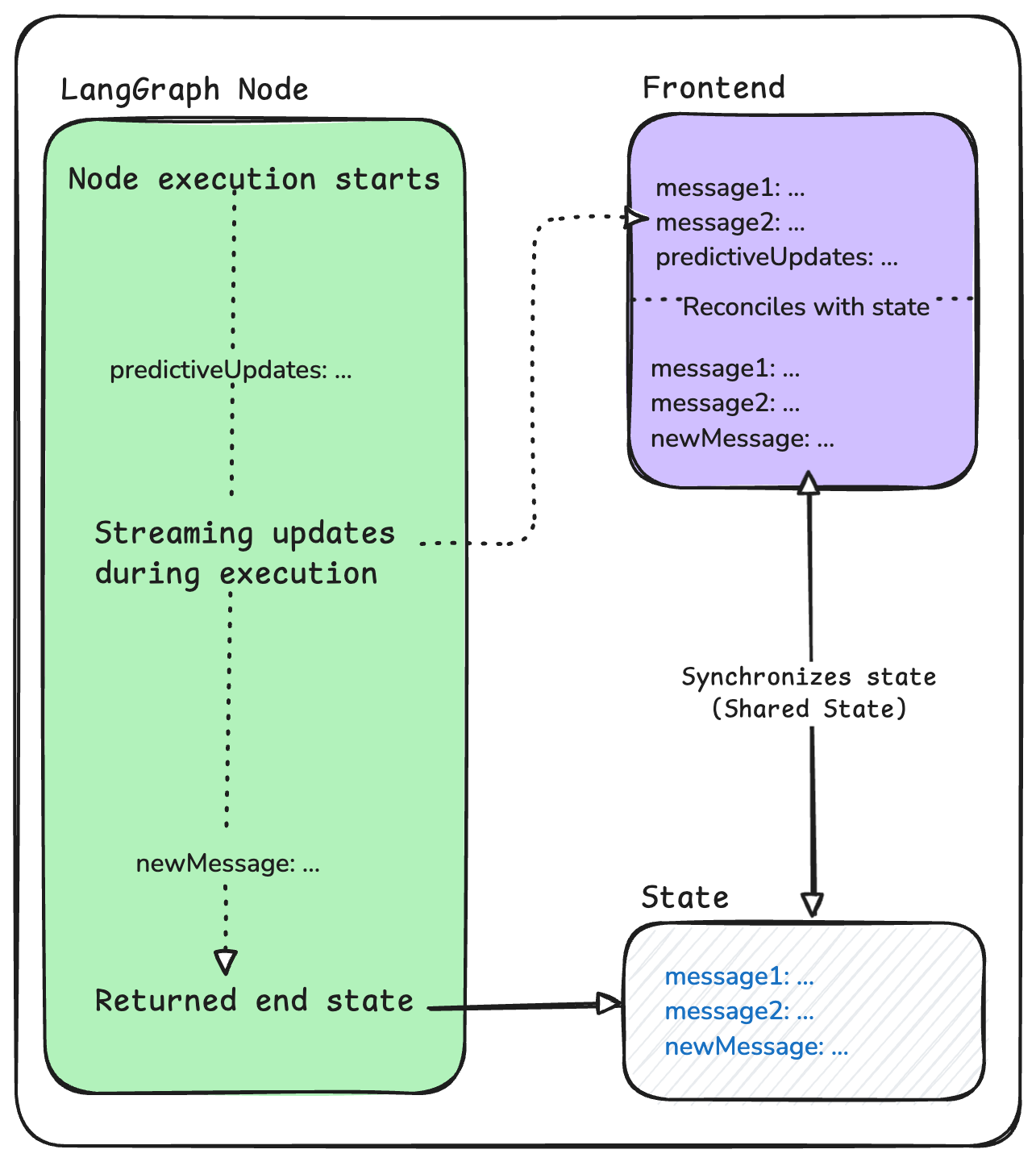
LangGraph agents are stateful. As a graph is traversed, the state is saved at the end of each node. CopilotKit uses the agent's state as the source of truth for what to display in the frontend chat. However, since state is only emitted at the end of a node, CopilotKit allows you to stream predictive state updates in the middle of a node. By default, CopilotKit will stream messages and tool calls being actively generated to the frontend chat that initiated the interaction. If this predictive state is not persisted at the end of the node, it will disappear in the frontend chat.
In this situation, the most likely scenario is that the messages property in the state is being updated in the middle of a node but those edits are not being
persisted at the end of a node.
I want these messages to be persisted
To fix this, you can simply persist the messages by returning the new messages at the end of the node.
from langchain_core.runnables import RunnableConfig
from copilotkit.langgraph import copilotkit_customize_config

async def chat_node(state: AgentState, config: RunnableConfig):
    # 1) Call the model with CopilotKit's modified config
    model = ChatOpenAI(model="gpt-5.4")
    response = await model.ainvoke(state["messages"], modifiedConfig)

    # 2) Make sure to return the new messages
    return {
        messages: response,
    }
async function chatNode(state: AgentState, config: RunnableConfig): Promise<AgentState> {
    // 1) Call the model with CopilotKit's modified config
    const model = new ChatOpenAI({ temperature: 0, model: "gpt-5.4" });
    const response = await model.invoke(state.messages, modifiedConfig);

    // 2) Make sure to return the new messages
    return {
        messages: response,
    }
}
I don't want these messages to streamed at all
In this case, you can reference our document on disabling streaming. More specifically, you can use the copilotkit config to disable emitting messages anywhere you'd like a message to not be streamed.
from langchain_core.runnables import RunnableConfig
from copilotkit.langgraph import copilotkit_customize_config

async def chat_node(state: AgentState, config: RunnableConfig):
    # 1) Configure CopilotKit not to emit messages
    modifiedConfig = copilotkit_customize_config(
        config,
        emit_messages=False, # if you want to disable message streaming
    )

    # 2) Call the model with CopilotKit's modified config
    model = ChatOpenAI(model="gpt-5.4")
    response = await model.ainvoke(state["messages"], modifiedConfig)

    # 3) Don't return the new response to hide it from the user
    return state
async function chatNode(state: AgentState, config: RunnableConfig): Promise<AgentState> {
    // 1) Configure CopilotKit not to emit messages
    const modifiedConfig = copilotkitCustomizeConfig(config, {
        emitMessages: false, // if you want to disable message streaming
    });

    // 2) Call the model with CopilotKit's modified config
    const model = new ChatOpenAI({ temperature: 0, model: "gpt-5.4" });
    const response = await model.invoke(state.messages, modifiedConfig);

    // 3) Don't return the new response to hide it from the user
    return state;
}
Running a subgraph or langchain?
Just make sure to pass the modified config we defined above as your RunnableConfig for the subgraph or langchain!