Architecture
How CopilotKit's pieces fit together
Open your coding agent in your project's folder, or in an empty folder for a new app.This runs in a coding agent on your computer.
CopilotKit is a three-layer stack — frontend, runtime, agent — connected by the open AG-UI event protocol. The runtime lives in your own application server, so the only thing between your UI and your agent is a wire format you can inspect.
The 30-second version#
- Frontend. A framework-native SDK and prebuilt chat components that connect your UI to a running agent.
- Runtime. A request handler mounted in your app server (Next.js, Express, Hono, Bun, Deno, Workers). Brokers auth, tool calls, and the AG-UI stream.
- Agent. Any AG-UI-compatible backend — Built-in, LangGraph, Mastra, CrewAI, Pydantic AI, MAF, or your own.
- AG-UI is the wire format: 16 event types, transport-agnostic, framework-agnostic. Swap any layer without rewriting the others.
The three layers#
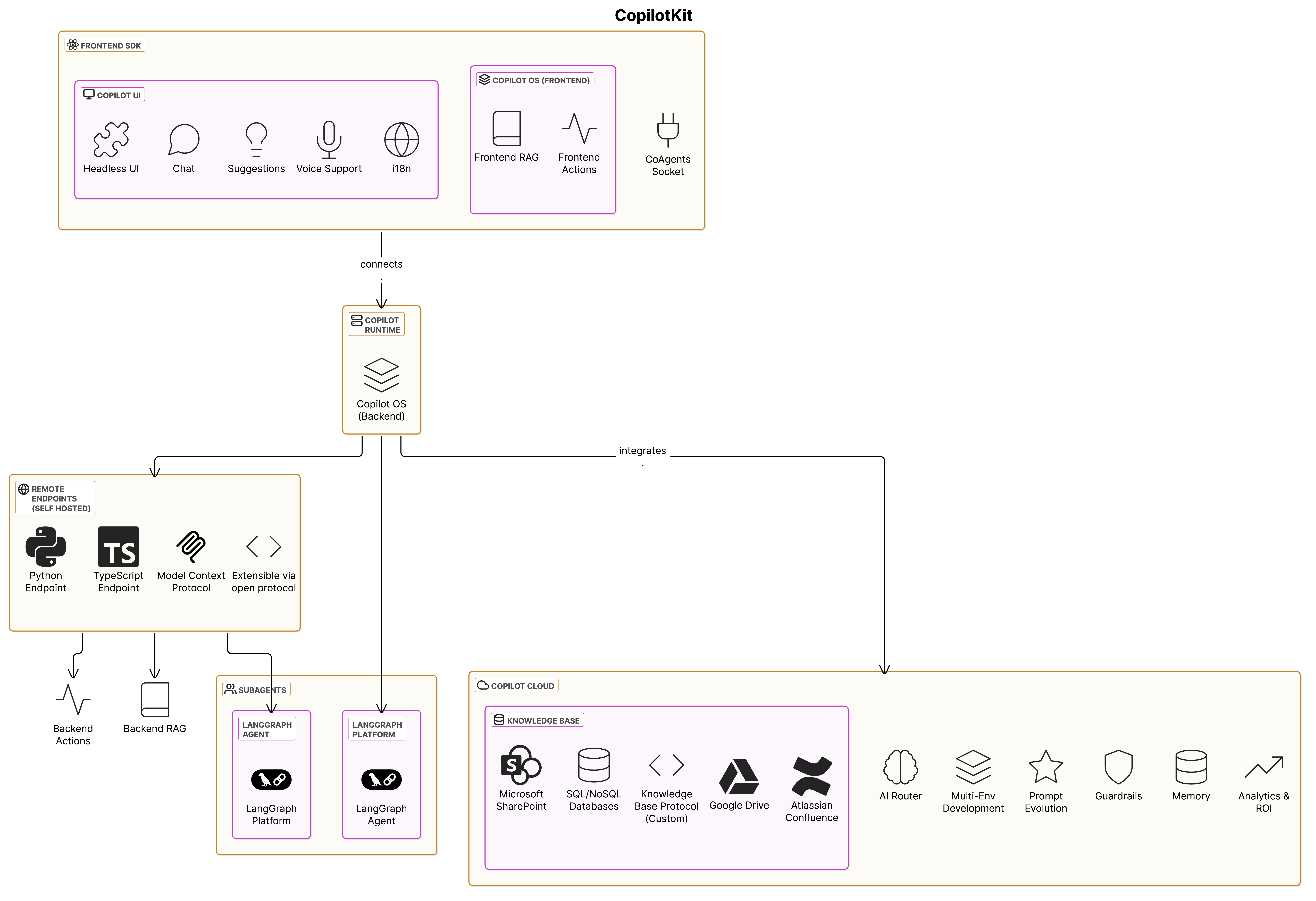
1. Frontend#
The application your users interact with. CopilotKit ships framework-native
state and tool APIs plus prebuilt components such as CopilotChat,
CopilotSidebar, and CopilotPopup. Use a prebuilt chat surface, build a
fully custom UI with the headless APIs, or mix the two.
2. Runtime#
A request handler that mounts inside your application server (Next.js App Router, Express, Hono, Bun, Deno, Cloudflare Workers). The runtime accepts requests from the frontend, mediates auth and tool calls, and forwards work to your agent over AG-UI. For the framework-agnostic path you can instantiate a BuiltInAgent in-process and skip an external agent process entirely.
3. Agent#
The agent backend you choose: LangGraph, Mastra, CrewAI, Pydantic AI, Microsoft Agent Framework, the Built-in Agent, or any custom AG-UI-compatible implementation. The agent runs your prompt, calls tools, emits state, and streams events back to the runtime.
AG-UI: the protocol bridge#
CopilotKit doesn't lock you into one agent framework. The runtime talks to your agent over AG-UI, an open, event-driven protocol that standardizes how agents communicate with applications:
- Event-driven — 16 standardized event types (text deltas, tool calls, state snapshots and deltas, run lifecycle) stream from the agent through the runtime to the frontend.
- Bidirectional — users send input, agents respond, agents pause for human-in-the-loop input, frontends expose frontend tools the agent can invoke.
- Transport-agnostic — SSE, WebSockets, webhooks, whatever your stack prefers.
- Framework-agnostic — every supported integration ships a thin AG-UI adapter. Switch backends with one line of runtime configuration.
"The future of agents isn't one company or one platform — it's an agentic ecosystem connected by protocols."
Because the contract is a protocol — not an SDK lock-in — you can swap the agent layer without rewriting the frontend, run multiple agent backends side by side, and integrate with anything AG-UI-compatible: MCP servers, A2UI components, Oracle / Google / AWS agent platforms.
Request flow at a glance#
- A user sends a message in your frontend application.
- The frontend agent API posts to your runtime endpoint.
- Runtime opens an AG-UI session with the configured agent.
- Agent emits text, tool calls, and state updates as AG-UI events.
- Runtime streams the events back; the frontend renders them in real time.
- If the agent calls a frontend tool, the runtime relays the request, your browser handler runs, and the result flows back to the agent.
- Threads, persistence, and realtime sync (when configured) are mediated by CopilotKit Intelligence — the platform backend that sits beside the runtime.
Where to go next#
- Practical setup — Quickstart wires all three layers in ~10 minutes against the Built-in Agent.
- Protocol depth — AG-UI documentation covers every event type, transport option, and middleware hook.
- Backend choices — Agents & Backends explains the runtime, custom agents, and the trade-offs between Built-in, external frameworks, and bring-your-own.
- CopilotKit Intelligence overview — CopilotKit Intelligence covers Threads, persistence, inspection, and the cloud-hosted or self-hosted decision.